|
Produktbeskrivelse
|
BenQ Board Essential RE6504 RE04 Series - 65" LED-bagbelyst LCD paneldisplay - 4K - for undervisning
|
|
Produkttype
|
LED-bagbelyst LCD fladt paneldisplay med berøringsskærm (multi-berøring)
|
|
Diagonal klasse
|
65"
|
|
Kommercielt brug
|
Ja - undervisning
|
|
Platform
|
Android
|
|
Opløsning
|
3840 x 2160
|
|
Display Format
|
4K UHD (2160p)
|
|
Video Grænseflade
|
HDMI
|
|
HDMI Port Antal
|
3 porte
|
|
Konnektivitet
|
LAN
|
|
PC grænseflade
|
VGA (HD-15), DisplayPort
|
|
Teknologi
|
IPS
|
|
LCD-baggrundsbelysningsteknik
|
Direkte belyst LED
|
|
Billedformatforhold
|
16:9
|
|
Tv-tuner
|
Ingen radio
|
|
Kommercielle funktioner
|
OPS Slot
|
|
Billedforbedringer
|
72 % Color Gamut NTSC
|
|
Højttalersystem
|
2 højttalere
|
|
Lagerkapacitet
|
32 GB
|
|
Understøttede hukommelseskort
|
microSD
|
|
USB
|
6 porte
|
|
Udstyr inkluderet
|
Fjernstyring, 2 styluser
|
|
Spænding
|
AC 100-240 V (50/60 Hz)
|
|
Strømforbrug ved drift
|
66.7 watt
|
|
Strømforbrugs-stand by
|
0.5 watt
|
|
Dimensioner (B x D x H)
|
148.21 cm x 8.77 cm x 90.7 cm
|
|
Vægt
|
36.4 kg
|
|
Miljømæssige standarder
|
ENERGY STAR kvalificeret
|
Fra og med fredag den 3. juli 2026 lukker kontoret kl. 16.30 om fredagen. Mandag til torsdag er kontakttiden i salg uændret fra kl. 09.00 til 17.00, mens kontakttiderne for bogholderi, indkøb og RMA generelt er uændrede.
For at se vores fulde sortiment, priser og opnå den fulde adgang til vores webshop, skal du logge ind.
Log ind på din konto her eller registrer dig som kunde her.
BenQ Board Essential RE6504 LED-bagbelyst LCD fladt paneldisplay 3840 x 2160 65"
BenQ Board Essential RE6504 - 65" Diagonal klasse RE04 Series LED-bagbelyst LCD paneldisplay - undervisning - med berøringsskærm (multi-berøring) - Android - 4K UHD (2160p) 3840 x 2160 - direkte belyst LED
Specifikationer

Udv. specifikationer
|
Generelt
|
|
|---|---|
|
Beskyttelse
|
Støvresistent
|
|
Billedforbedringer
|
72 % Color Gamut NTSC
|
|
Bredde
|
148.21 cm
|
|
Diagonal klasse
|
65"
|
|
Dybde
|
8.77 cm
|
|
HDMI Port Antal
|
3 porte
|
|
Højde
|
90.7 cm
|
|
Kombineret med
|
Berøringsskærm (multi-berøring)
|
|
Kommercielt brug
|
Ja - undervisning
|
|
Operativsystem
|
Android OS 13
|
|
PC grænseflade
|
VGA (HD-15), DisplayPort
|
|
Platform
|
Android
|
|
Produkttype
|
LED-bagbelyst LCD fladt paneldisplay
|
|
Sensorer
|
Omgivende lyssensor (ALS), Infrared (IR)
|
|
Serie
|
RE04 Series
|
|
Strømforbrug ved drift
|
66.7 watt
|
|
Tilstande
|
Liggende tilstand
|
|
TV Tuner Presence
|
Nej
|
|
Tv-tuner
|
Ingen radio
|
|
Vægt
|
36.4 kg
|
|
Video Grænseflade
|
HDMI
|
|
Billedskærm
|
|
|
Antal berøringspunkter
|
40
|
|
Baggrundslysets levetid
|
50,000 time(r)
|
|
Belægning
|
Anti-genskin, 9H Hard
|
|
Billedformatforhold
|
16:9
|
|
Billedkontrastforhold
|
1200:1
|
|
Display Format
|
4K UHD (2160p)
|
|
Driftstider/-dage
|
18 / 7
|
|
Dynamisk kontrastforhold
|
30000:1
|
|
Egenskaber
|
Infrarød touch teknologi, tekst-til-talefunktion, Low Blue Light Technology, Flimrefri teknologi, 10-bit support, Account Management System (AMS), Device Management Solution (DMS), præcisionsberøringsteknologi
|
|
Klarhed
|
450 cd/m²
|
|
Kommercielle funktioner
|
OPS Slot
|
|
LCD-baggrundsbelysningsteknik
|
Direkte belyst LED
|
|
LCD-skærmteknologi
|
IPS
|
|
Opløsning
|
3840 x 2160
|
|
Responstid
|
8 ms
|
|
Synsfeltsvinkel
|
178 grader
|
|
Stander & Beslag
|
|
|
Standardmontering af fladt panel
|
600 x 400 mm
|
|
Væg Montering Inclusive
|
Ja
|
|
VESA-kompatibilitet
|
Ja
|
|
Media Player
|
|
|
Konfiguration
|
ARM Cortex-A73 Quad-Core + ARM Cortex-A53 Quad-Core - 8 GB - 32 GB - Mali G52 MP8
|
|
Understøttede hukommelseskort
|
microSD
|
|
USB Port
|
Ja
|
|
USB Port Antal
|
6
|
|
Fjernbetjening
|
|
|
Type
|
Fjernstyring
|
|
Lydsystem
|
|
|
Højttalere
|
2 x hovedkanalhøjttaler - 20 watt
|
|
Højttalersystem
|
2 højttalere
|
|
Udgangseffekt/i alt
|
40 watt
|
|
Netværk & Internet Multimedie
|
|
|
Applikations-butik
|
Google Play
|
|
Forbind og del
|
InstaShare 2
|
|
Funktionalitet
|
Whiteboard
|
|
Konnektivitet
|
LAN
|
|
LAN protokol
|
Gigabit Ethernet
|
|
Tilslutninger
|
|
|
Forbindelsestype
|
VGA-indgang | 3 x HDMI-indgang | HDMI-udgang | DisplayPort | 2 x USB 2.0 | 2 x USB 3.0 | USB-C 2.0 | USB-C 3.0 med 65 W Power Delivery | Berøring | Lydindgang | Øretelefoner | SPDIF-udgang | Gigabit LAN | Mikrofon | RS-232
|
|
Diverse
|
|
|
Medfølgende ledninger
|
VGA-kabel - 3 m | HDMI-kabel - 3 m | USB-berøringskabel - 3 m | USB-C kabel - 1.5 m
|
|
Overensstemmelsesstandarder
|
IEC 60529 IP5X, TÜV safety certification, Google EDLA
|
|
Udstyr inkluderet
|
2 styluser
|
|
Bæredygtighedsoplysninger
|
|
|
ENERGY STAR-certificeret
|
Ja
|
|
Effekt
|
|
|
Indgangspænding
|
AC 100-240 V (50/60 Hz)
|
|
Strømenhed
|
Strømforsyning
|
|
Strømforbrugs-stand by
|
0.5 watt
|
|
Mål & vægt (forsendelse)
|
|
|
Bredde (forsendelse)
|
164 cm
|
|
Dybde (forsendelse)
|
18.5 cm
|
|
Højde (forsendelse)
|
101 cm
|
|
Vægt (forsendelse)
|
49.4 kg
|
|
Miljømæssige parametre
|
|
|
Fugtighedsgrad ved brug
|
20 - 80% RH (non-condensing)
|
|
Maks. driftstemperatur
|
40 °C
|
|
Min. driftstemperatur
|
0 °C
|
Media
.jpg)
Harness the power of Google
The EDLA-certified BenQ Board combines Google services with ever-reliable BenQ hardware and software.
Expansive app library
Install education apps directly from Google Play for more interactive lessons.Go-to Google services
Access essential Google Core Services such as Google Drive and Meet.Google Docs editors
Quickly open lesson files with any Google app on a large touchscreen display..png)
Direct file access
Google Drive integration lets you access and save files to your cloud storage directly from the board..png)
Built-in data security
Keep your boards safe against security and privacy threats with Google Play Protect and Safe Browsing..png)
.png)
Use your own files
Import a variety of lesson files, interact with its contents on the whiteboard, and then export the session as an editable file for a future class..png)
A tool for every need
Pull up any of EZWrite’s built-in tools that are designed to engage students, and meet a wide variety of lesson activities and subjects..png)
Take lessons to the cloud
Extend the whiteboard so that others can participate and interact with the board whether they’re joining from their seats or from home.Built-in AI tools for more inclusive lessons

Text-to-speech
Have displayed text read aloudMultilingual translation
Translate text with a tapOCR
Edit text from imported images.jpg)
.png)
Your own space and data
All accounts are secure and separate—allowing you to have your own teaching space while preventing others from accessing your data..jpg) 0:08
0:08Organise with ease
Save time by having all your most-used apps, files, and widgets arranged and accessible directly from your home screen..png)
Snap. Record. Write.
The Floating Tool lets you take snapshots, record your screen, and annotate over any app, file, webpage, or video displayed on the board..png)
Sidebar access
Expand the sidebar for convenient access to recent apps, files, and input sources, as well as a shortcut to the home screen.*Available in Q2..png)
Expanded search
Use BenQ Search to quickly query related content from the internet or sort through your lessons files stored on the board or your cloud..png)
Enhance your lesson flow
Increase teaching efficiency with the multi-window mode, allowing you to whiteboard while using other apps on the side. *Available in Q3..png)
5-in-1 connectivity
The multipurpose USB-C port allows for quick data transmission, clear audio/video playback, touchback controls, and 65-watt charging..png)
Full vibrant audio
Experience enhanced audio with the board’s built-in 20-watt speakers that offer crisp, room-filling sound.All hands on board
The BenQ Board Essential’s large interactive screen is designed for whole-class participation, letting you boost engagement and liven up your lessons.
40 touch points
Get everyone actively participating in class with the RE04’s 40 touch points.Gap-free writing
No gaps and an 8ms response time ensure a natural writing experience every time.Precise touch
You’re guaranteed smooth interactions with the board’s Precision IR technology..jpg)
.png)
.png)
.png)
Control your device from the board
Share multiple screens simultaneously
Cast the board to connected devices
.png)
Beyond screen sharing
Do more than just cast your screen. Media sharing makes lessons more dynamic. Share photos, videos, or even a live camera feed from your device directly to the board..png)
Moderate sessions with ease
Host controls allow you to effectively manage your sessions. Accept or reject sharing requests and show or hide screens, while the AI Guardian automatically blocks nude content..png)
.png)
Effortless user list syncing
Simplify identity management by syncing any of your existing Google Workspace, Entra ID (formerly Azure Active Directory), ClassLink, LDAP, or SAML-based user lists..png)
Centralised management
Remotely manage all your BenQ devices on an all-in-one console that lets you install, update, and delete apps, push firmware updates, and automate tasks such as startup and shutdown..png)
Enhanced data security
Safeguard your data through the RE04’s secure login options and access controls, regular system updates, and built-in Google Play Protect and Safe Browsing measures..png)
Data-driven efficiency
Generate specific and comprehensive device analytics so you can monitor how your boards are being utilised and adjust usage guidelines to maximise efficiency..png)
School-wide announcements
With X-Sign Broadcast, you can send out timely announcements to all your BenQ displays. Inform your school about upcoming events, important reminders, and emergencies..png)
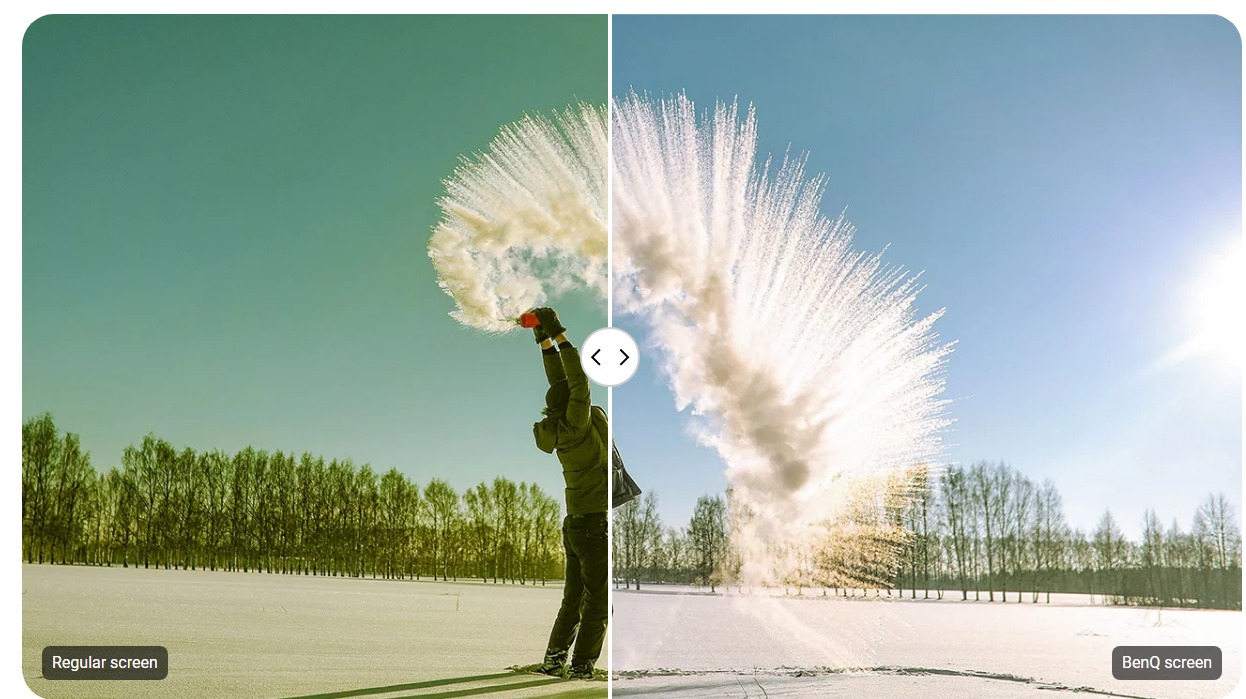


TÜV certified
Flicker-free
Low blue light
Anti-glare
.png)
IP5X dust protection
The IEC 60529-complaint RE04 screen prevents dust accumulation even in the most dust-prone environments..png)
.png)
.png)
.png)
.png)
.png)
.png)
.png)