EN   DA   SV
To gain full access to our webshop, find our entire product range and see our prices, you need to be logged in.
Log in to your account here or sign up as a customer here.

With more than 1,000 different cables and adapters in stock - and even more in remote stock - it can be challenging to find the right cable - and this is where our intuitive cable guide comes into play.

Here you will find the right cable in 3 simple steps:

  1. Select cable type
  2. Select cable end A
  3. Select cable end B

Cable type

USB
USB

Cable end A

Cable end B

USB-C Male forbindes til denne port/kabelende
USB-C Male
Kabel ende: USB-C Male

Show all options

Computertilbehør og software

(1)

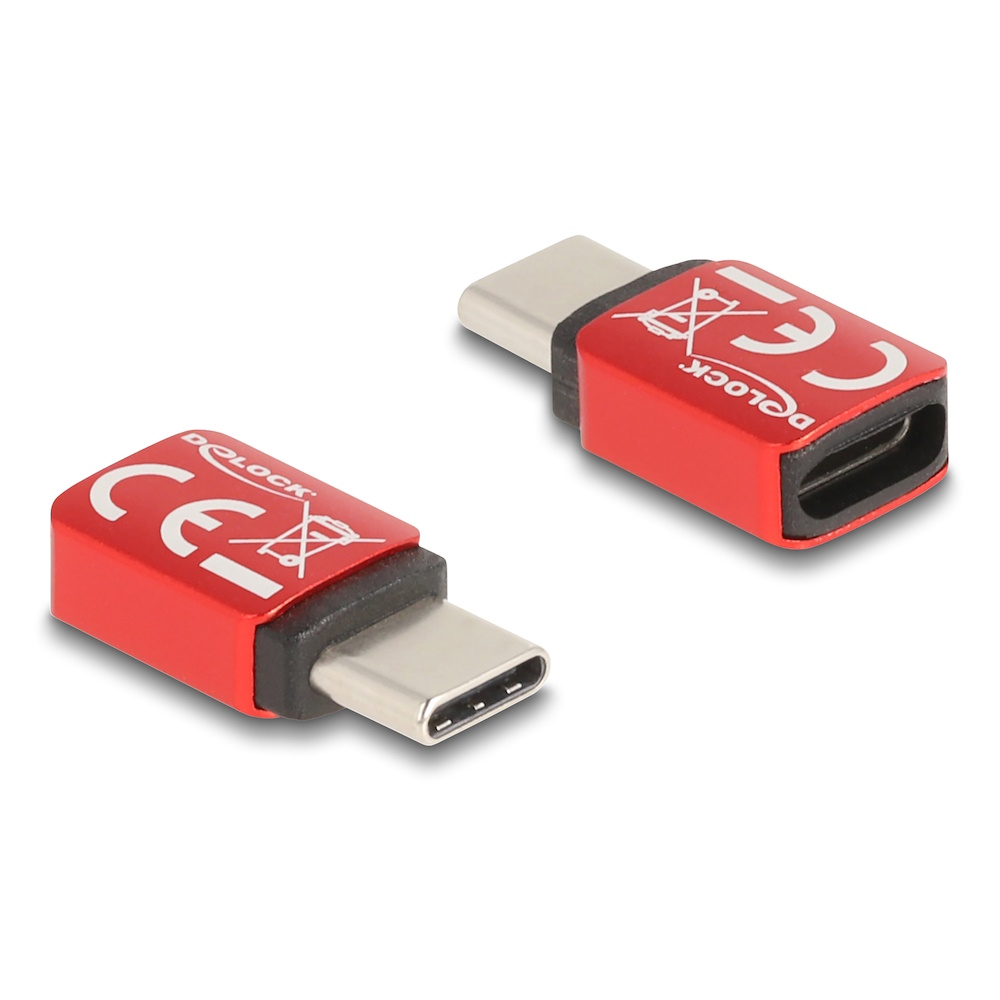
Delock USB-C Data Blocker 240 W

  • Product no 1002372043
  • Model 60689
  • Brand DeLOCK
  • EAN 4043619606894

Computer Accessories and Software

Computer accessories and software form the foundation of an efficient workspace across retail environments, volume purchasing operations and fully automated webshops. A well-curated selection of PC accessories, licences and peripheral devices supports stable workflows, reduces support needs and ensures consistent user experiences. This category brings together everything from mice, keyboards and headsets to conference kits, creative input tools and office software, enabling assortments to match various performance levels and customer demands.

Advantages for Resellers

A structured assortment of computer accessories and software helps cover both everyday requirements and specialised setups. The breadth of PC equipment and IT accessories enables flexible configurations ranging from entry-level to premium, allowing resellers to target multiple price segments. These product groups have high replacement frequency and stable add-on potential, making them relevant for dropship shops, physical retailers and professional procurement workflows. Clear categorisation and strong brand consistency support predictable replenishment and efficient feed-based purchasing.

Key Considerations in This Category

  • Technical criteria – connectivity (USB, Bluetooth, dongle), platform compatibility, audio and video quality, ergonomics and OS/application support.
  • Commercial criteria – tiered price points, campaign-ready bundles (e.g. mouse + keyboard, webcam + microphone) and strong brand positioning.
  • Operational requirements – plug-and-play reliability, certification for common collaboration platforms and standardisation across user groups.
  • Relevant selection parameters – form factor, wired vs. wireless, noise reduction, camera resolution, software features and licence models.

Related Subcategories

Software
Licences and applications for productivity, security and creative workloads, enabling consistent user environments and simplified licence handling.

Other Accessories
Supplementary PC accessories and specialised items that add flexibility to product assortments across different use cases.

VR Headsets
Virtual reality headsets suited for simulation, training, visualisation and advanced user scenarios.

PC Security
Physical security products such as locks and privacy filters that protect devices and sensitive data.

PC Cleaning
Cleaning equipment for screens, keyboards and peripheral hardware to maintain device longevity and workplace hygiene.

Conference Kits
Integrated audio/video solutions for meeting rooms and hybrid workspaces, combining speakers, microphones and optional cameras.

Microphones
Desktop and studio microphones for meetings, recording and streaming, with attention to pickup patterns and clarity.

Webcams
Web cameras designed for video meetings and content recording, with emphasis on resolution, low-light performance and platform compatibility.

PC Speakers
Speaker solutions for office desks and meeting spaces, ranging from basic audio to higher-performance configurations.

Office Headsets
Headsets designed for professional calls and virtual meetings, often featuring noise reduction and platform certifications.

Drawing Tablets
Pen tablets for graphic design, photo editing and creative workflows where accuracy and driver optimisation are essential.

Mouse & Keyboard Accessories
Wrist rests, mouse mats and ergonomic additions that improve comfort during extensive computer use.

Mouse & Keyboard Sets
Matched sets suitable for new workstation rollouts and environments requiring uniform equipment.

Keyboards
Standalone keyboards in a variety of layouts and form factors, including ergonomic and compact options.

Mice
Standalone computer mice for office, mobile and advanced usage scenarios, where precision and comfort are key factors.

Brands in This Category

Frequently Asked Questions

How should a computer accessories assortment be structured?

Start with essential items such as mice, keyboards, headsets, webcams and core software, and extend with premium or specialised options to support tiered purchasing.

What factors matter most when selecting headsets and conference equipment?

Noise reduction, long-term comfort, microphone performance and certification for major collaboration platforms.

How is compatibility ensured across different PC accessories?

By standardising on trusted brands and series that support the operating systems and tools used across the organisation.

When should mice and keyboards be offered as sets versus standalone units?

Sets are ideal for workstation rollouts, while standalone items suit replacements and incremental upgrades.

What is the most efficient way to manage software licences?

Choose licence models that match update cycles and organisation size, and keep product selections consistent across users for simplified support.

Guide to Finding the Right Cable

Video cables, audio cables, lightning cables, USB-C cables, smartphone cables, computer cables, accessories, and adapters. Finding the right cable can be a challenge, but at DCS ApS, we’ve made it easy to find exactly what you need, whether it’s USB, HDMI, network cables, or any other type of cable.

A cable is an essential component that serves as a bridge between electronic devices by transmitting both electrical current and signals for various purposes, including electric vehicles, networks, Hi-Fi, and much more. The core of a cable typically consists of a conductive material like copper or aluminum, which is carefully chosen for its excellent ability to conduct electricity.

What Is the Difference Between a Wire and a Cable?

The difference between a wire and a cable typically lies in their construction. A cable is a more complex solution, consisting of multiple wires and protective layers. A wire is simply a single strand or several strands that solely conduct electrical current.

In short:

WireA single strand or small group of strands, primarily for simple electrical tasks.

Cable: A composition of multiple wires with added protection, used for more complex tasks and higher current capacities.

Which Cable Do You Need?

There are many different types of cables, but with our intuitive cable guide, you can always find the right cable with just a few clicks. Start by selecting your cable type and then the two cable ends—and you’re on your way.

At DCS ApS, You Can Compare Over 1,000 Different Cables

Whether you’re looking for your next SATA cable, power cable, DVI cable, DisplayPort cable, Apple cable, USB cable, or network cable, you’ll find it at DCS ApS—and if you’re in doubt, you can always contact us for expert advice.

At DCS ApS, we have over 1,000 different cables, adapters, and accessories in stock from manufacturers like DeLock, Goobay, Apple, Havit, Samsung, LogiLink, Green Cell, Dudao, and many more. Our extensive selection is constantly expanding, so use the guide to find the perfect match for your needs.