


To gain full access to our webshop, find our entire product range and see our prices, you need to be logged in.
Log in to your account here or sign up as a customer here.
Log in to your account here or sign up as a customer here.
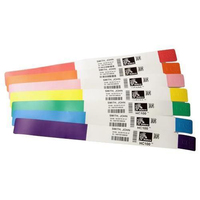
Zebra Z-Band UltraSoft Voksen-armbånd 25 x 279 mm 1068stk.
Zebra Z-Band UltraSoft - Polypropylen (PP), syntetisk - skinnende - permanent gummiklæbemiddel - hvid, gul - 25 x 279 mm 1068 stk. (6 rulle(r) x 178 voksen-armbånd - for Zebra HC100, HC100 Patient I.D. Solution
-
Product no 995272528
Model 10015355-YK
Brand Zebra Technologies
EAN 9999999999999
Weight 2.62 kg
-
Product information and specifications are guiding only. Without notice, these can be subject to change by the manufacturer. This applies for product images as well.
| Type | Hospitalsarmbånd |
| Produktfarve | Hvid, Gul |
| Størrelse | 27,9 cm (11") |
| General | |
|---|---|
| Shipping Weight | 2.5 kg |
| Media | |
| Adhesive Type | Permanent rubber adhesive |
| Card / Label Qty per Sheet/Roll | 178 |
| Features | Water-resistant, abrasion-resistant, antimicrobial coating, alcohol-resistant, smear-resistance, latex-free, tamper-evident closure, indoor/outdoor use |
| Included Qty | 1068 pcs. |
| Media Color | White, yellow |
| Media Sizes | 25 x 279 mm |
| Media Type | Adult wristbands |
| Printing Technology | Direct thermal |
| Product Material | Polypropylene (PP), synthetic |
| Qty of Media with Cards | 6 roll(s) |
| Surface Finish | Glossy |
| Miscellaneous | |
| Color Category | White, yellow |
| Compatibility Information | |
| Compatible with | Zebra HC100, HC100 Patient I.D. Solution |
RMA
For reklamations og garantihåndtering venligst opret sag hos Zebra via linket her: https://www.zebra.com/us/en/support-downloads/request-repair.htmlFor warranty handling please create a case directly with Zebra service here: https://www.zebra.com/us/en/support-downloads/request-repair.html