EN   DA   SV
To gain full access to our webshop, find our entire product range and see our prices, you need to be logged in.
Log in to your account here or sign up as a customer here.
We don't have products matching your search criteria in our local stock, so we included results from our external stocks.
Show all options
Show all options
Show all options
Show all options
Show all options

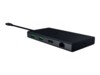
Club3D CSV-1580 Thunderbolt 4 5-in-1 Dockingstation

  • Product no 999082915
  • Model CSV-1580
  • Brand Club 3D
  • EAN 8719214471958

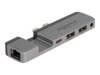
StarTech.com USB C Multiport Adapter, USB-C to 4K 60Hz HDMI 2.0, 100W Power Deli

  • Product no 999862726
  • Model DKT31CHPD3
  • Brand StarTech.com
  • EAN 0065030880763

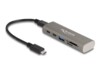
DeLOCK USB-C / Thunderbolt 3 Dockingstation

  • Product no 999941890
  • Model 87780
  • Brand DeLOCK
  • EAN 4043619877805

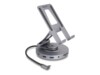
Gamber-Johnson Dockingstation

  • Product no 999526060
  • Model 7160-1506-00
  • Brand Gamber-Johnson
  • EAN 0041898992329

Targus USB-C Universal Dual HD Docking Station with 80W PD Pass-Thru USB-C 3.2 G

  • Product no 1000878847
  • Model DOCK116GLZ
  • Brand Targus
  • EAN 5051794040326

i-Tec USB-C / USB4 / USB 3.0 Thunderbolt 3 / Thunderbolt 4 Dockingstation

  • Product no 1001064360
  • Model CATRIPLE4KDOCKPD2
  • Brand i-Tec
  • EAN 8595611706073

Gamber-Johnson Dockingstation

  • Product no 994205529
  • Model 7160-0860-00
  • Brand Gamber-Johnson
  • EAN 0041898987585

Delock USB-adapter Sort

  • Product no 1000967392
  • Model 66076
  • Brand DeLOCK
  • EAN 4043619660766

StarTech.com USB-C Multiport Adapter, 4K 60Hz HDMI w/HDR, 2-Port 5Gbps USB 3.0 H

  • Product no 1000856115
  • Model 103B-USBC-MULTIPORT
  • Brand StarTech.com
  • EAN 0065030894005

StarTech.com USB-C Docking Station - Multi Monitor HDMI/DP/DP Alt Mode USB-C Doc

  • Product no 1000856120
  • Model DK31C3MNCRUE
  • Brand StarTech.com
  • EAN 0065030898133

Eaton Tripp Lite Series USB-C Dock, Dual Display - 4K 60 Hz HDMI, USB 3.2 Gen 1,

HyperDrive Next Dockingstation

  • Product no 1001158110
  • Model HD4005GL
  • Brand Targus
  • EAN 1220000639980

j5create USB4 / Thunderbolt 4 Dockingstation

  • Product no 1000823082
  • Model JCD392-N
  • Brand j5 create
  • EAN 4712795086331

j5create JCA374 USB-C 3.1 Dockingstation

  • Product no 1000823071
  • Model JCA374-N
  • Brand j5 create
  • EAN 4712795081039

j5create JCA379EW USB-C 3.2 Gen 1 Dockingstation

  • Product no 1001393644
  • Model JCA379EW-N
  • Brand j5 create
  • EAN 4712795087505

i-Tec 11-in-1 USB-C / USB4 / Thunderbolt 3 / Thunderbolt 4 Dockingstation

  • Product no 1001517823
  • Model C31FLAT2PDPRO100W
  • Brand i-Tec
  • EAN 8595611706639

Microsoft USB-C Travel Hub USB-C Dockingstation

  • Product no 1001682386
  • Model 161-00002
  • Brand Microsoft
  • EAN 0196388249589

Lenovo ThinkPad 5000 USB4 Dockingstation

  • Product no 1003754706
  • Model 40BF0100EU
  • Brand Lenovo
  • EAN 0195892132486

D-Link DUP-501 Hub 5-porte 5-porte 5-porte 5-porte

  • Product no 1003893136
  • Model DUP-501
  • Brand D-Link
  • EAN 0790069478284

Manhattan USB-C Dockingstation

  • Product no 1002276403
  • Model 153966
  • Brand Manhattan
  • EAN 0766623153966

Sandberg Dockingstation

  • Product no 1002871962
  • Model 136-65
  • Brand Sandberg
  • EAN 5705730136658

ALOGIC Fusion Pro GO USB-C Dockingstation

  • Product no 1003148483
  • Model FUPHD1
  • Brand ALOGIC
  • EAN 9350784027337

Cablexpert A-CM-COMBO3-04 USB-C 3.2 Gen 1 Dockingstation

  • Product no 1003789287
  • Model A-CM-COMBO3-04
  • Brand Gembird
  • EAN 8716309137256

Belkin AVC021HQBK Hub 5-porte

Dockingstations for multiple purposes

Docking stations are most often used in office environments or by individuals looking for a plug-and-play solution. With a docking station, you can avoid cable clutter and the hassle of plugging or unplugging multiple cables – just connect your laptop to the dock.

Offer a wide selection to your customers

With our large range of docking stations, resellers can offer a broad selection to meet various needs.

Our docking stations come from well-known brands that produce some of the best on the market. You'll find docks from Lenovo, HP, Dell, Acer and Dudao.

Lenovo docking stations

Lenovo’s docking stations are some of the most popular and in-demand on the market. They feature a square, streamlined design with various ports including USB-C, USB-A, Micro-USB, HDMI, audio jack, and LAN cable.

Browse our range of Lenovo docking stations here.

HP docking stations

HP docking stations are known for their Thunderbolt support, offering fast charging and high compatibility. Check out our selection of HP docking stations here.

Dell docking stations

Dell docking stations are solid and even budget models often support up to 3 monitors with 4K resolution.

With the latest Thunderbolt technology, Dell docks offer rapid charging and smooth communication with connected devices like monitors, mice, keyboards, and more.

Explore our Dell docking stations here.

Acer docking stations

Acer’s docking stations are innovative, compact, and high-performing despite their small size.

Typically smaller than Dell or HP equivalents, Acer docks provide the same smart features that make connectivity easy and efficient.

See all our Acer docking stations here.

Dudao docking stations

Dudao is one of our top-selling brands. Despite a lower price point, Dudao docks offer high quality. Compact in size, they still provide the same performance and functionality as larger docks.

Offer your customers Dudao docks and be surprised by their quality. Find our Dudao dock selection here.

Which types of docking stations are best to stock?

Navigating the docking station market can be tricky, but several key factors can guide your purchasing decisions.

Compatibility, number of ports, and monitor support are the most important features. More options and specs – such as DisplayPort, Thunderbolt, and 4K resolution – usually mean higher prices, while simpler docks are more affordable.

Docking stations offer many benefits

A docking station makes it easy and convenient to connect your laptop to your office setup. Depending on the model, you can usually connect up to three monitors, increasing efficiency and reducing setup time.

Benefits of using docking stations:

Avoid cable clutter: Set up once – then just plug in the laptop to connect to your screen, mouse, keyboard, and other accessories.

Easy plug-and-play: With one cable, you're ready to go – easy to leave or return to your desk.

Compact size: Modern docks take up little space, freeing up your desk area.

Time-saving: Save time with the quick plug-and-play functionality.