|
Produktbeskrivelse
|
ASUS ROG EQUALIZER White Edition - strømkabel - 16-pin PCI-strøm til 16-pins PCI Express - 75 cm
|
|
Type
|
Strømkabel
|
|
Egenskaber
|
Premium graveret kabel, dual-tonede stik, guldbelagte ben
|
|
Kabel længde
|
75 cm
|
|
Forbindelsesled
|
16-pin PCI Express-strøm - han
|
|
Stikforbindelse (anden ende)
|
16-pins PCI Express strøm med 2-pins GPU First-stik - han
|
|
Producentgaranti
|
3 års garanti
|
Effective Friday, July 3, 2026, the office will close at 4:30 PM on Fridays. From Monday to Thursday, Sales contact hours remain unchanged from 9:00 AM to 5:00 PM, while contact hours for Accounting, Purchasing, and RMA remain unchanged in general.
To gain full access to our webshop, find our entire product range and see our prices, you need to be logged in.
Log in to your account here or sign up as a customer here.
ASUS ROG 16-pin PCI Express-strøm (male) - 16 pin PCI Express power with 2-pin GPU First connector (male) Hvid Strømkabel
ASUS ROG EQUALIZER White Edition - Strømkabel - 16-pin PCI-strøm (han) til 16-pins PCI Express (han) - 75 cm
Specifications

Media
.jpg)
.jpg)
.jpg)
.jpg)
.jpg)
.jpg)
.jpg)
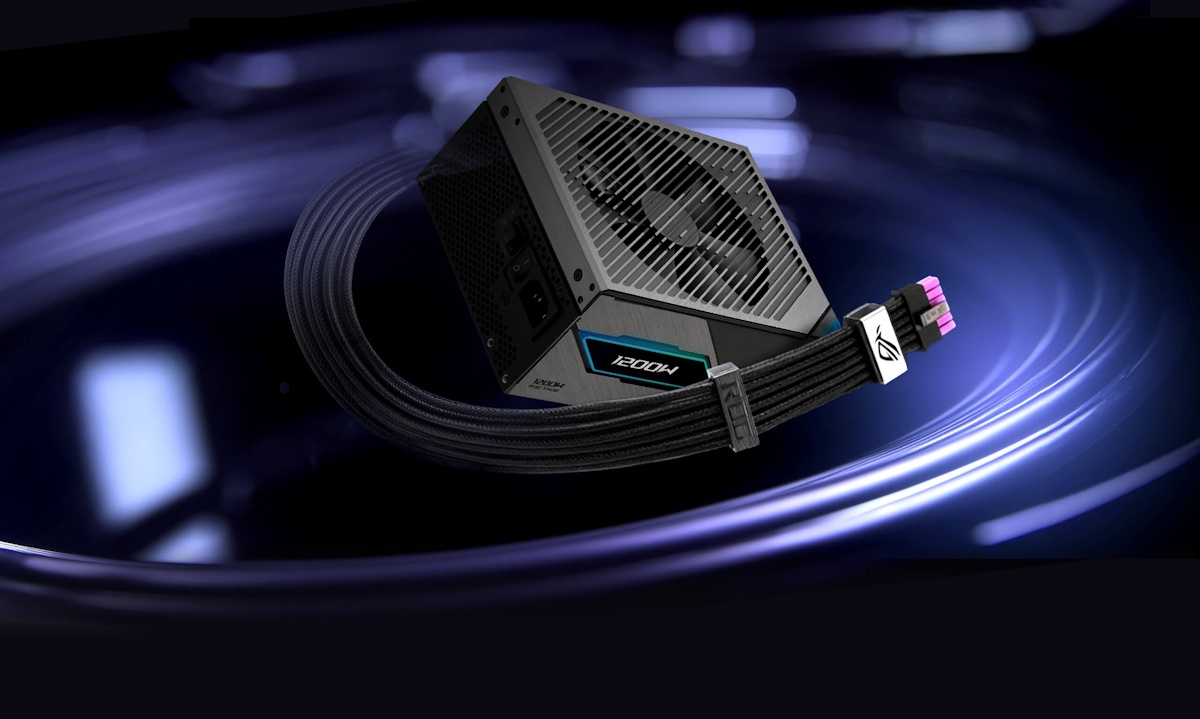
12v-2x6 PCIe power cable
ROG Equalizer
Redefined Power Protection
Patented Design
Reduced Cable Temperature
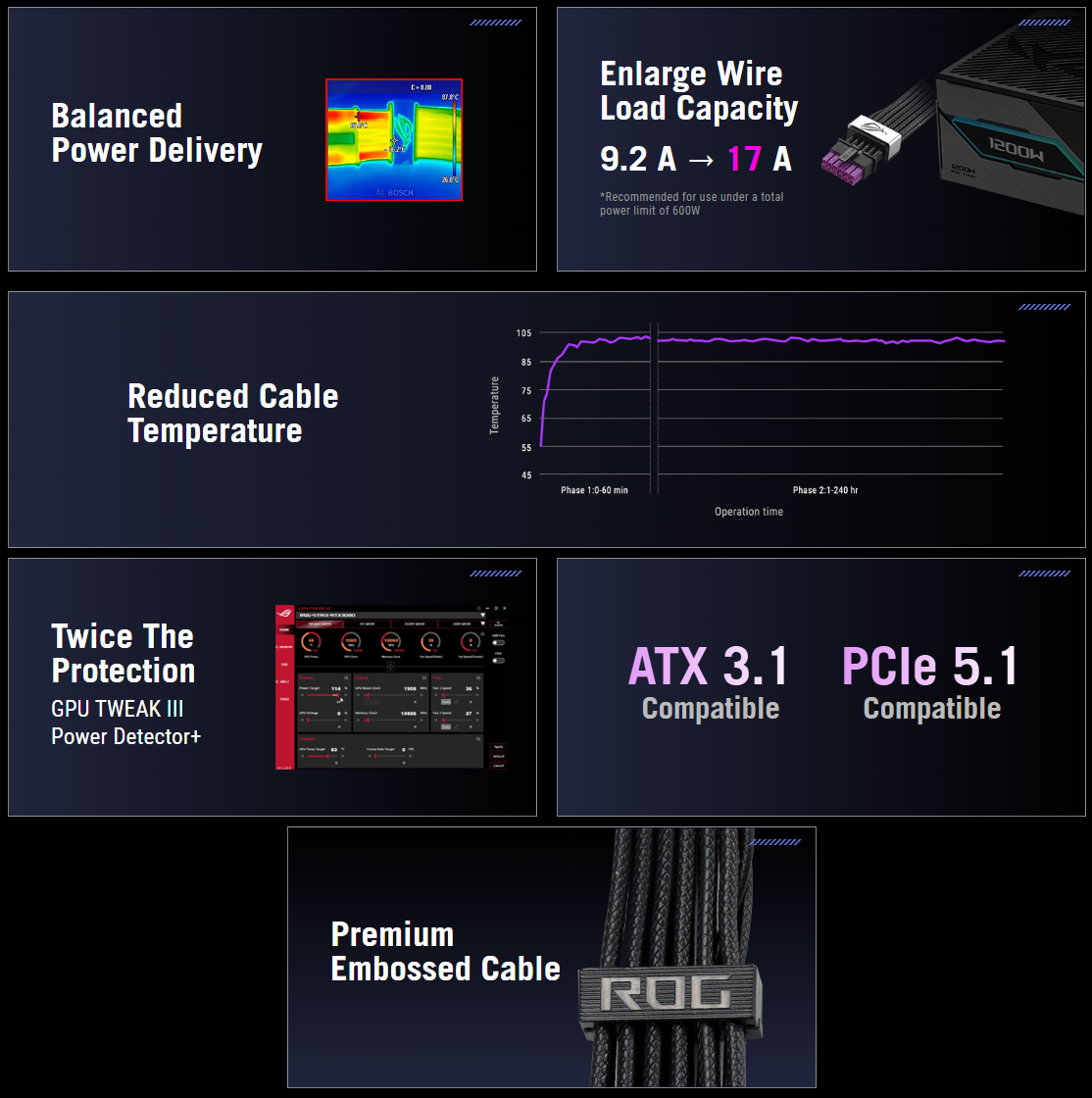
In demanding 600 W scenarios, uneven current distribution can cause hot spots in conventional 12V-2x6 cables over long periods of use.ROG Equalizer helps balance power delivery to reduce thermal stress and maintain stable temperatures. Even under extreme conditions, it keeps cable and connector temperatures within the 105°C material limit for safer, more reliable operation.
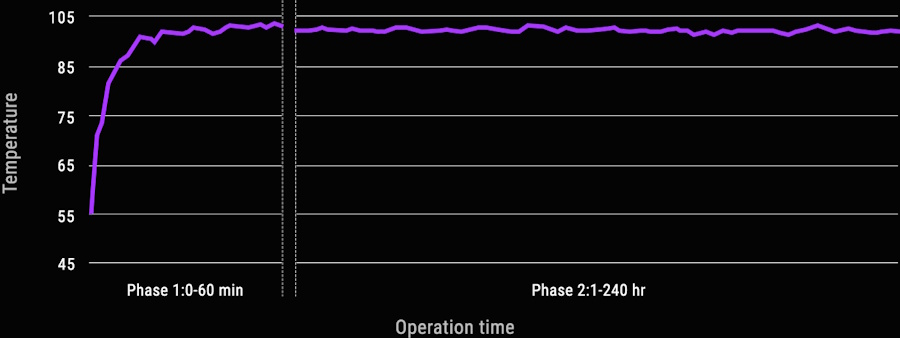
Test conditions : Ambient temperature: 55°C / Total Power: 600 W
The middle 4 wires of the +12 V cable disconnected to the graphics card 16pin
The middle 4 wires of the +12 V cable disconnected to the graphics card 16pin
.png)
Enlarge Wire Load Capacity
Standard 12V-2x6 cables are rated for 9.2A per wire, while ROG Equalizer cables boost current capacity to 17A per wire. This is designed to improve the handling of short-term current peaks that may be produced by high-end graphics cards during extreme overclocking or when otherwise drawing a high amount of wattage from the power supply.This enhanced design improves durability under 600 W continuous loads for a significantly longer lifespan than conventional cables, industry-leading reliability, and stable power delivery.
9.2 A -> 17 A
*Recommended for use under a total power limit of 600 WBalanced Power Delivery
ROG Equalizer ensures balanced current delivery from PSU to ROG Equalizer, lowering graphics card connector temperatures and maintaining stable thermal performance below the 105°C material limit.
Under an extreme test scenario, we removed the middle 4 wires from the +12 V cable to simulate potential current imbalance conditions that may occur with a standard 12 V-2x6 PCIe cable. Even under these conditions, the ROG Equalizer maintained a temperature of approximately 87.8°C. In contrast, a standard 12V-2x6 PCIe cable reached around 146°C — far exceeding safe operating limits.
Under an extreme test scenario, we removed the middle 4 wires from the +12 V cable to simulate potential current imbalance conditions that may occur with a standard 12 V-2x6 PCIe cable. Even under these conditions, the ROG Equalizer maintained a temperature of approximately 87.8°C. In contrast, a standard 12V-2x6 PCIe cable reached around 146°C — far exceeding safe operating limits.
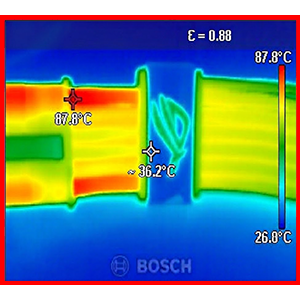
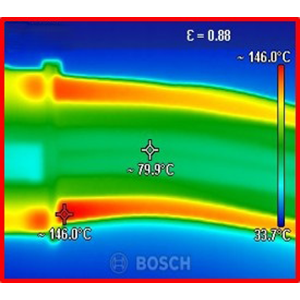
ROG Equalizer
~87.8°C
Without ROG Equalizer
~87.8°C
*Testing method: This extreme test removes the four middle wires of the +12 V 16‑pin PCIe power cable to evaluate cable temperature performance under maximum current load.
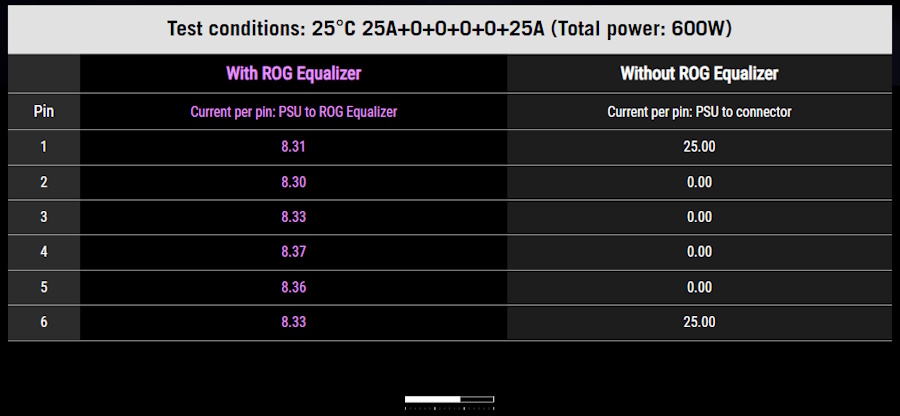
Twice the Protection
Enable ROG Equalizer mode in GPU Tweak III Power Detector+ to activate dual-layer protection, combining hardware-level safeguards with real-time monitoring for enhanced stability and peace of mind under heavy workloads..jpg)
.png)
.png)
Cable Comb
The quick-release cable comb design offers enhanced flexibility for personalized cable routing, allowing users to fine-tune cable alignment and achieve a clean, well-organized build.Dual-Color 12 V-2x6 PCIe Cable Connector
The 12 V-2x6 PCIe cable connector has a purple design and includes a clear visual indicator for proper insertion, helping ensure a secure connection.Enlarged, gold-plated spring contacts on the GPU-side connector increase contact area with the graphics card pins, reducing contact resistance and improving durability over repeated mating cycles.
LATEST STANDARDS
.jpg)
ATX 3.1 & PCIe 5.1 Compatible
Meet the stringent requirements of the ATX 3.1 standard and supports PCIe 5.1 graphics cards. It supports total power excursions up to twice the rated power and graphics card power excursions up to three times the rated power, helping to ensure rock-solid stability for your PC.Please see the FAQ section for specific instructions on the proper usage of this advanced 16-pin cable.
PREMIUM EMBOSSED CABLES
Made from a pliable premium material, these embossed cables are easily flexible during installation, and they operate at temperatures 50°C lower than the safety limit when routed for cable management.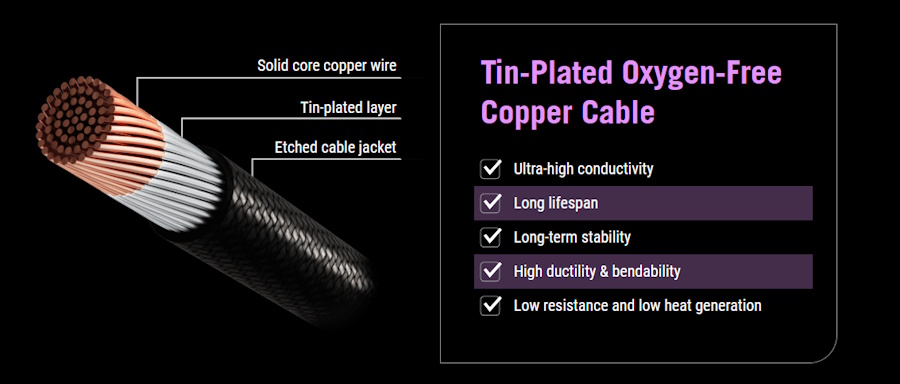
.jpg)
These cables also meet the rigorous standards of the UL1581 flame test and UL758 certification, helping to ensure a smooth PC DIY experience and exceptional safety.
Broad compatibility
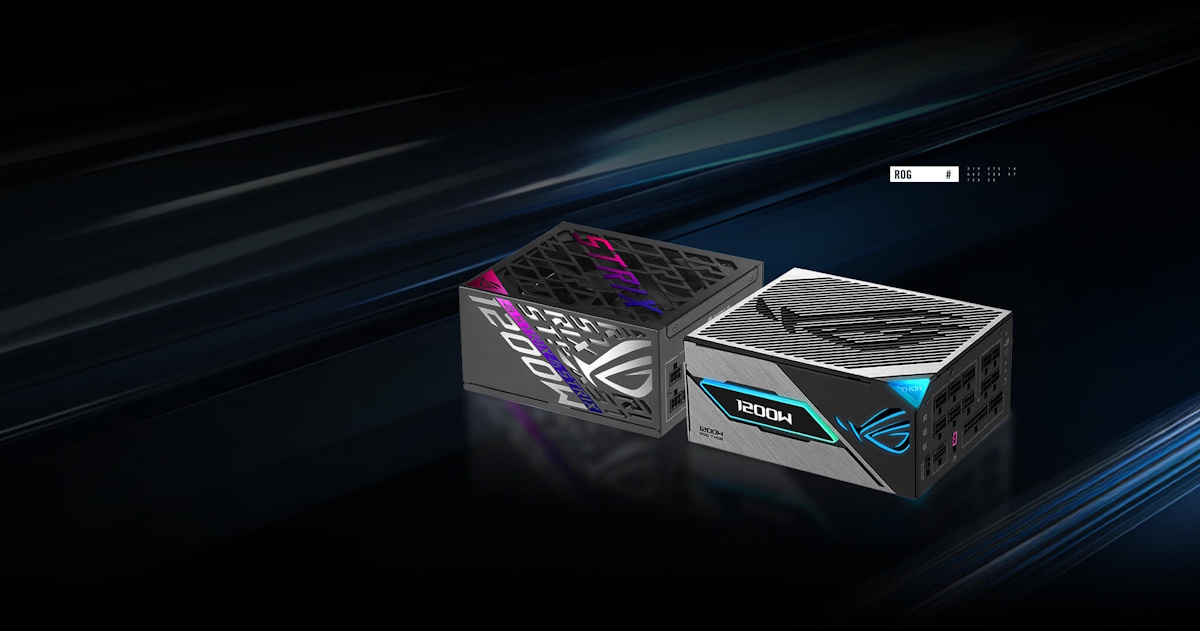
Compatible With PSUs from Leading Manufacturers
ROG Equalizer is compatible with power supplies from all leading manufacturers. For users looking to add an extra layer of protection, it can be seamlessly integrated into existing power setups without altering the current system configuration, offering a flexible and easy upgrade path.
.jpg)
FAQ
Why do I need an ROG Equalizer?
Aging materials or changes in connector contact quality can cause uneven resistance, resulting in localized heat buildup within GPU power connectors. ROG Equalizer ensures reducing temperature differences and protecting the graphics card.
How does the ROG Equalizer cable enhance power delivery, stability, and safety under heavy loads?
Thermal stability is the primary design goal of the ROG Equalizer cable. An innovative conductive bridging architecture enables it to efficiently dissipate heat and eliminate the risk of hotspots. This increased efficiency and thermal capacity is designed to deliver rock-solid stability and connection reliability—meeting the rigorous safety demands of high-powered, high-performance graphics cards.
What is the maximum short-term current peak supported by each pin of the ROG Equalizer Cable?
Each pin is engineered to support a short-term current peak of up to 17A. A physical bridging design, optimized cable materials, and advanced thermal management significantly increase current tolerance per pin and enhance the overall thermal robustness of the connector. This high-spec configuration provides an ample power safety margin and longer service life, protecting system stability under extreme power conditions.
Why does the ROG Equalizer use gold-plated contacts?
ROG employs a high-specification hard gold-plating process to ensure long-term stability and reliability based on the following considerations:
- Superior oxidation resistance: Gold possesses high chemical stability and does not easily form insulating oxide layers, so consistent electrical contact is maintained.
- Robust moisture protection: This reduces the risk of contact degradation that may occur in high-humidity environments.
- Stable contact performance: This ensures a secure and stable interface with tin-plated surfaces, reducing initial contact resistance and heat generation.
- Exceptional wear resistance: The hard gold-plating reduces abrasion from repeated plugging and unplugging, which to maintain long-term reliability.
- Long-term stability design: By maintaining a stable, low-oxidation, and low-resistance contact state at the cable end, the overall system remains within a safe operating range, even as natural changes occur at the graphics card interface over time.
What are the benefits of the ROG Equalizer’s unique structural design for chassis installation and cable management?
The ROG Equalizer features a reinforced bridging structure designed to deliver stable connectivity and safety while catering to practical installation needs:Dual focus on stability and safety: The bridging architecture maintains connector stability within confined spaces, minimizing the risk of misalignment or poor contact caused by tension or bending. This helps ensure long-term operational reliability. Installation recommendations: For the best experience, users should leave at least 4 centimeters of clearance between the chassis side panel and the power connector on their graphics card. This allows the cable to form a natural curve for optimal connection stability and system safety.
Can the ROG Equalizer be disassembled and reinstalled on other cables?
No, users are strongly advised against disassembling the ROG Equalizer or connecting it to other cables. To ensure optimal protection, use the product as originally manufactured.
How can I get the ROG Equalizer?
ROG Equalizer is bundled with the 2026 ASUS ROG Thor III and ASUS ROG Strix Platinum power supplies. The ROG Equalizer is bundled with the 2026 ASUS ROG Thor III and ASUS ROG Strix Platinum power supplies. Alternatively, it can be purchased separately.
Does the ROG Equalizer support ATX 3.1 and PCIe 5.1?
Yes, the ROG Equalizer utilizes a 12V-2x6 power interface compliant with ATX 3.1 and PCIe 5.1 specifications.
Are there any specific models that the ROG Equalizer is recommended for or officially supports?
No specific model requirements. The ROG Equalizer is bundled with the 2026 ASUS ROG Thor III and ASUS ROG Strix Platinum power supplies, and is also compatible with power supplies (ATX3.1 with native 12V-2x6 connector) from all leading manufacturers.
- Products certified by the Federal Communications Commission and Industry Canada will be distributed in the United States and Canada. Please visit the ASUS USA and ASUS Canada websites for information about locally available products.
- All specifications are subject to change without notice. Please check with your supplier for exact offers. Products may not be available in all markets.
- Specifications and features vary by model, and all images are illustrative. Please refer to specification pages for full details.
- PCB color and bundled software versions are subject to change without notice.
- Brand and product names mentioned are trademarks of their respective companies.
- Unless otherwise stated, all performance claims are based on theoretical performance. Actual figures may vary in real-world situations.
- The actual transfer speed of USB 3.0, 3.1, 3.2, and/or Type-C will vary depending on many factors including the processing speed of the host device, file attributes and other factors related to system configuration and your operating environment.
About ASUS
ASUS is a multinational company best known for their motherboards, PCs, monitors, graphics cards and routers. Along with an expanding range of superior gaming, content-creation and AIoT solutions, ASUS leads the industry through cutting-edge design and innovations made to create the most ubiquitous, intelligent, heartfelt and joyful smart life for everyone. With a global workforce that includes more than 5,000 R&D professionals, ASUS is driven to become the world’s most admired innovative leading technology enterprise.
About ROG
Republic of Gamers (ROG) is an ASUS sub-brand dedicated to creating the world’s best gaming hardware and software. Formed in 2006, ROG offers a complete line of innovative products known for performance and quality, including motherboards, graphics cards, laptops, desktops, monitors, audio equipment, routers and peripherals. ROG participates in and sponsors major international gaming events. ROG gear has been used to set hundreds of overclocking records and it continues to be the preferred choice of gamers and enthusiasts around the world.
© 2026 ASUS Computer International. All Rights Reserved. ASUS is a registered trademark of ASUSTeK Computer. All specifications and terms are subject to change without notice. Please check with your supplier for exact offers on selected models. Products may not be available in all markets. Product may not be exactly as shown in photos. Actual colors may differ from their appearance due to variation of monitor restrictions and color processing. All trademarks are registered to their respective companies. ASUS shall not be liable for technical or editorial errors or omissions contained herein.
ASUS is a multinational company best known for their motherboards, PCs, monitors, graphics cards and routers. Along with an expanding range of superior gaming, content-creation and AIoT solutions, ASUS leads the industry through cutting-edge design and innovations made to create the most ubiquitous, intelligent, heartfelt and joyful smart life for everyone. With a global workforce that includes more than 5,000 R&D professionals, ASUS is driven to become the world’s most admired innovative leading technology enterprise.
About ROG
Republic of Gamers (ROG) is an ASUS sub-brand dedicated to creating the world’s best gaming hardware and software. Formed in 2006, ROG offers a complete line of innovative products known for performance and quality, including motherboards, graphics cards, laptops, desktops, monitors, audio equipment, routers and peripherals. ROG participates in and sponsors major international gaming events. ROG gear has been used to set hundreds of overclocking records and it continues to be the preferred choice of gamers and enthusiasts around the world.
© 2026 ASUS Computer International. All Rights Reserved. ASUS is a registered trademark of ASUSTeK Computer. All specifications and terms are subject to change without notice. Please check with your supplier for exact offers on selected models. Products may not be available in all markets. Product may not be exactly as shown in photos. Actual colors may differ from their appearance due to variation of monitor restrictions and color processing. All trademarks are registered to their respective companies. ASUS shall not be liable for technical or editorial errors or omissions contained herein.