
|
Produktbeskrivelse
|
ASUS ROG Swift PG27AQWP-W - OLED-monitor - QHD - 27" - HDR
|
|
Enhedstype
|
OLED-monitor - 27"
|
|
Energimærke QR-kode URL
|
Https://eprel.ec.europa.eu/qr/2463599
|
|
Energiklasse
|
Klasse F
|
|
Adaptive-Sync teknologi
|
AMD FreeSync Premium Pro, NVIDIA G-SYNC Compatible
|
|
Egenskaber
|
USB 3.2 Gen 1 hub
|
|
Formatforhold
|
16:9
|
|
Standard opløsning
|
QHD 2560 x 1440 ved 540 Hz
|
|
Pixel Pitch
|
0.229 mm
|
|
Lysstyrke
|
1500 cd/m²
|
|
Kontrastforhold
|
1500000:1
|
|
HDR-kapabel
|
HDR10 / DisplayHDR 500 True Black
|
|
Responstid
|
0,02 ms (grå-til-grå)
|
|
Gaming
|
Ja
|
|
Farve support
|
1.073,7 millioner farver (10-bit)
|
|
Farvespektrum
|
99.5% DCI-P3, 135% sRGB
|
|
Input-stik
|
2xHDMI, DisplayPort
|
|
Justeringer til display-position
|
Højde, pivot (rotering), drejbar, tilt
|
|
Skærmbelægning
|
Genskinsbehandling
|
|
Spænding
|
AC 100-240 V (50/60 Hz)
|
|
Farve
|
Sølv
|
|
Dimensioner (B x D x H) - med stander
|
60.56 cm x 27.35 cm x 54.79 cm
|
|
Vægt
|
7.04 kg
|
|
Producentgaranti
|
3 års garanti
|
Effective Friday, July 3, 2026, the office will close at 4:30 PM on Fridays. From Monday to Thursday, Sales contact hours remain unchanged from 9:00 AM to 5:00 PM, while contact hours for Accounting, Purchasing, and RMA remain unchanged in general.
To gain full access to our webshop, find our entire product range and see our prices, you need to be logged in.
Log in to your account here or sign up as a customer here.
ASUS ROG Swift PG27AQWP-W 27" 2560 x 1440 (2K) HDMI DisplayPort 540Hz
ASUS ROG Swift PG27AQWP-W - OLED-monitor - gaming - 27" (26.5" til at se) - 2560 x 1440 QHD @ 540 Hz - 1500 cd/m² - 1500000:1 - DisplayHDR 500 True Black - 0.02 ms - 2xHDMI, DisplayPort - sølv
Product information and specifications are guiding only. Without notice, these can be subject to change by the manufacturer. This applies for product images as well.
Specifications

Media
.jpg)
.png)
.png)
.png)
.png)
.png)
.png)
.png)
.png)
.jpg)
See Through The Game
ROG Swift OLED PG27AQWP-W
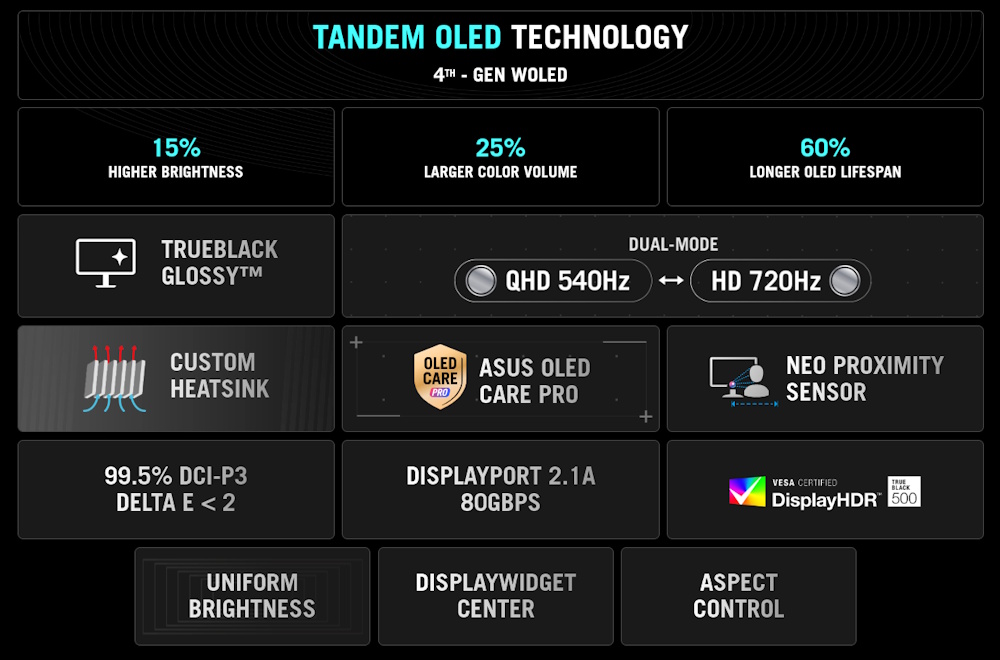
The world fastest OLED monitor* — ROG Swift OLED PG27AQWP-W redefines gaming performance with dual-mode QHD @ 540 Hz or HD @ 720 Hz visuals and a 0.02 ms gray-to-gray response time. This 26.5-inch QHD OLED monitor boasts new Tandem OLED technology for 15% higher peak brightness, 25% larger color volume, and 60% longer OLED lifespan compared to previous-generation WOLED panels. The TrueBlack Glossy™ panel provides a zero-haze surface to ensure exceptional clarity and supersharp imagery. And to guard against panel burn-in, the PG27AQWP-P features ASUS OLED Care Pro technology with the Neo Proximity Sensor. Extensive connectivity options include HDMI® and DisplayPort™ 2.1a UHBR20 with full 80 Gbps bandwidth, ensuring compatibility with a wide range of devices.
*As of August 2025.
*As of August 2025.
.jpg) 0:36
0:36Gaming-Changing Visuals
Tandem OLED Technology
Tandem OLED technology pushes the boundaries with unrivaled OLED performance and longevity. It boasts an innovative four-layer stacked-structure design that allows for enhanced light emission, superior color reproduction, and significantly-longer panel lifespan compared to previous OLED panels..png)
15% Higher Brightness
Tandem OLED technology gives monitor brightness a boost, giving the PG27AQWP-W 15% brighter visuals than WOLED panels — so visuals pop off the screen with incredible intensity to bring games and movies to life. Plus, the PG27AQWP-W complies with the VESA DisplayHDR™ 500 True Black standard to ensure breathtaking highlights and inky blacks for unmatched contrast and realism..png)
.png)
25% Larger Color Volume
The innovative four-layer stacked structure of Tandem OLED panels gives the PG27AQWP-W 25% larger color volume to show off more vibrant reds, deeper blues and every shade in between — especially when gaming in HDR. Colors are more accurate, more nuanced, and more lifelike, drawing viewers deeper into the action.60% Longer OLED Lifespan
Tandem OLED technology offers exceptional panel longevity and energy efficiency, thanks to the four-layer design. Together with the built-in heatsink, the technology provides up to 60% longer lifespan compared to previous-generation OLEDs and significantly reduces the risk of burn-in to ensure years of stunning visuals without compromise.Supersharp and clear imagery
Exclusive TrueBlack Glossy™ OLED Panel
The PG27AQWP-W features an OLED panel with the new TrueBlack Glossy™ zero-haze optical layer that presents deep blacks under any lighting. The advanced anti-reflective layer reduces ambient reflections by 38% compared to previous-gen glossy WOLEDs, ensuring distraction-free gaming even in brightly-lit rooms.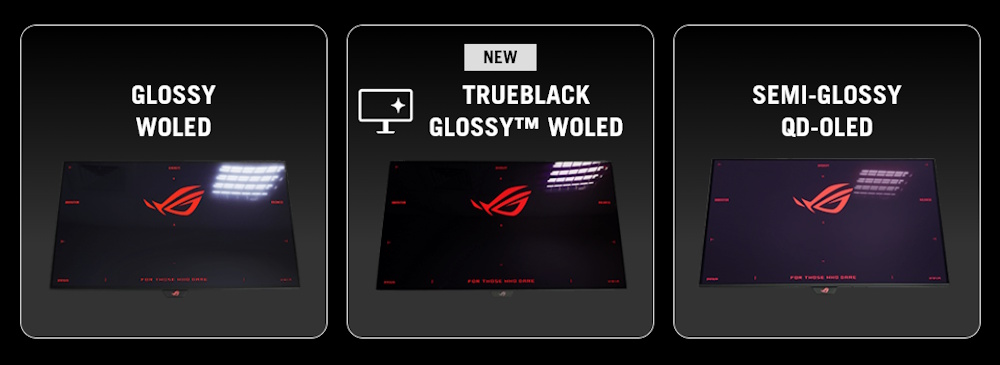
Groundbreaking Dual-Mode Feature
The Dual-Mode feature allows gamers to seamlessly switch between QHD at an ultra-responsive 540 Hz for maximum visual fidelity or tap the hotkey to switch to HD visuals at 720 Hz for the ultimate advantage in esports titles where every millisecond counts. This flexibility means the PG27AQWP-W is optimized for any game and situation, ensuring peak performance at all times.Crafted for Performance
.png)
Futuristic Finish
The monitor's sleek, silver finish exudes a sense of modern sophistication and high-performance capability..png)
Transparent Rear Panel
The ROG Swift OLED PG27AQWP-W features a unique, semi-transparent shell that subtly exposes the inner workings of the monitor. Every element reflects the spirit of performance and precision..png)
Sustainable Design
The PG27AQWP-W embraces sustainable design with its innovative hollow-style stand. This design uses less material, reducing its environmental impact without compromising stability.
FOURTH-GENERATION WOLED TECHNOLOGY
Clear text
Clear Pixel Edge
The Clear Pixel Edge algorithm reduces green and red fringing on text and lines for improved reading experiences. Additionally, the PG27AQWP-W features the latest RGWB subpixel layout to improve text quality.Improved motion clarity
Extreme Low Motion Blur
Exclusive ASUS Extreme Low Motion Blur technology reduces ghosting and motion blur.OLED advantages
OLED Advantages
The extremely high contrast ratio offered by the OLED panel results in the deepest black hues and vivid colors. Plus, an astounding 0.02 ms gray-to-gray response time ensures supersmooth, low-latency gameplay.1.5M:1
contrast ratio
contrast ratio
0.02 ms
response time
response time
99.5%
DCI-P3 gamut
DCI-P3 gamut
Delta E < 2
SCREEN PROTECTION
ASUS OLED CARE PRO
New ASUS OLED Care Pro technology provides a full set of customizable monitor settings to protect and ensure the longevity of the OLED panel. Plus, it includes the new Neo Proximity Sensor designed to guard against panel burn-in. All settings can be easily managed via DisplayWidget Center.NEO PROXIMITY SENSOR
The built-in Neo Proximity Sensor precisely detects the user’s distance from the monitor. When the user steps away, the monitor transitions to a black image to protect against panel burn-in; when the user returns, content is instantly restored onscreen. Detection distance can be customized to suit personal preference, ensuring maximum convenience and protection.Note: When activating the user detection function, ensure that the monitor sensor is properly angled and clean.
PIXEL CLEANING
Recalibrates the screen when the monitor has been active for several hours ― a process* that takes just a few minutes and activates automatically when the monitor is turned off.*Do not unplug the power cord during the cleaning process.
SCREEN MOVE
Pixel locations are slightly shifted periodically to help prevent burn-in, and users can choose between several movement levels.SCREEN SAVER
Automatically dims the screen after two minutes of inactivity.LOGO BRIGHTNESS ADJUSTMENT
Automatically detects static onscreen logos and reduces their brightness to correct for potential picture-quality issues.OUTER DIMMING CONTROL
Automatically identifies and adjusts the brightest areas of the screen to reduce the risk of burn-in.TARGET MODE
Dims the entire screen, except for a selected pinned window, which maintains its current brightness setting.
Rich Connectivity
Unlock the Future with DisplayPort™ 2.1a
The PG27AQWP-W features the future-ready DisplayPort™ 2.1a UHBR20 with full 80 Gbps bandwidth, supporting QHD @ 540 Hz without compression while offering improved data-transmission efficiency.HDMI® 2.1
48 Gbps
FULL BANDWIDTH
48 Gbps
FULL BANDWIDTH
DISPLAYPORT™ 2.1a
80 Gbps
FULL BANDWIDTH
80 Gbps
FULL BANDWIDTH
ASPECT RATIO CONTROL
For competitive gamers who are more familiar with smaller 1080p monitors, the PG27AQWP-W can be set to replicate a 24.5-inch panel in esports mode, as well as other visual modes.ROG OLED Anti-Flicker
ROG-exclusive OLED Anti-Flicker technology offers three refresh rate ranges ― High, Mid, Off ― to reduce flicker during frame rate fluctuations and maintain an immersive gaming experience..gif)
Note: Videos may be simulated and dramatized for illustrative purposes.
DISPLAYWIDGET CENTER
DisplayWidget Center is powerful monitor management software designed to help users optimize, personalize, and fully utilize their display via a mouse — so there's no need to access the OSD menu. Additionally, DisplayWidget Center offers firmware update notifications and includes a direct update option. Users can also import or export display configurations for sharing.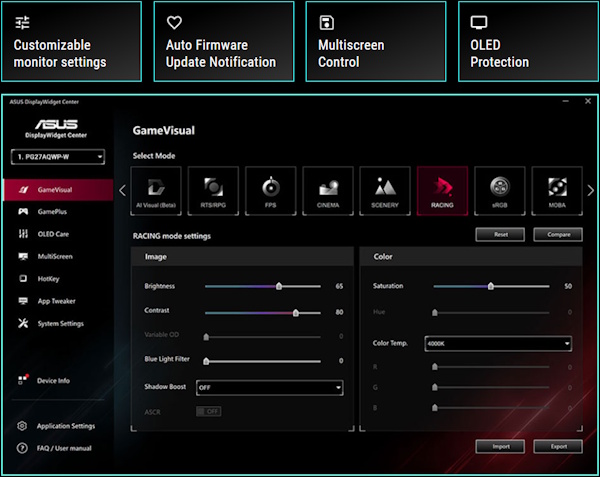
Play Smarter with AI Assistant
The AI Assistant in PG27AQWP-W includes AI Visual, Dynamic Crosshair, and Dynamic Shadow Boost. These features leverage AI technology to help gamers practice more effectively to improve their skills.Dynamic Crosshair
Automatically changes the crosshair to a color that contrasts with the background, so it stands out for more accurate aim.Dynamic Shadow Boost
Automatically enhances dark areas of the scene to make it easier to spot enemies hiding in dim areas of the map.AI Visual
Automatically detects what’s onscreen and adjusts to provide the best default or user-preset monitor settings through DisplayWidget Center**ASUS DisplayWidget Center software required.
*Images/videos may be simulated and dramatized for illustrative purposes.
UNIFORM BRIGHTNESS
When activated, the ROG-exclusive Uniform Brightness* setting within the OSD menu decreases peak brightness to keep levels consistent for better viewing — even when changing the size of bright white windows. It also makes marathon gaming sessions much more comfortable on the eyes.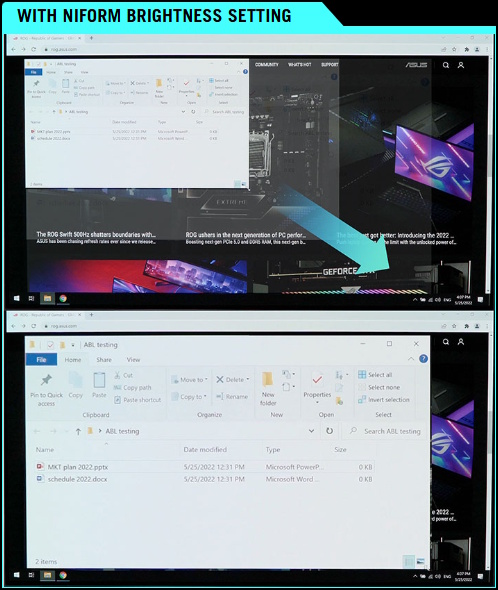
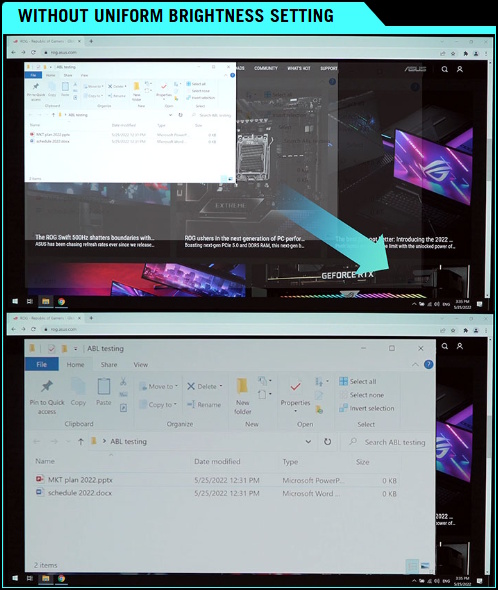
*When the monitor is in sRGB mode.
IN-GAME ENHANCEMENTS
SMOOTH ANDRESPONSIVE
The PG27AQWP-W features AMD FreeSync™ Premium Pro technology and NVIDIA® G-SYNC® compatibility, ensuring super-smooth, tear-free visuals with low latency.
GAMEPLUS
The ASUS-exclusive integrated GamePlus hotkey offers in-game enhancements. Co-developed with input from pro gamers, GamePlus enables gamers to practice and improve their gaming skills with the ROG Gaming AI technology-enhanced Dynamic Crosshair.GAMEVISUAL
ASUS GameVisual technology offers seven pre-set display modes to optimize visuals for different types of content. This unique feature can be easily accessed using a hotkey or via the OSD settings menu.FLICKER-FREE TECHNOLOGY
TÜV Rheinland-certified ASUS Flicker-Free technology eliminates flicker, ensuring comfortable viewing experiences. This technology helps minimize eyestrain and other potential issues typically associated with extended hours of viewing.

LOW BLUE LIGHTTECHNOLOGY
The new hardware-based ASUS Low Blue Light technology reduces potentially harmful high-energy blue-light emissions while offering color performance that’s better than monitors with software-based filtering solutions.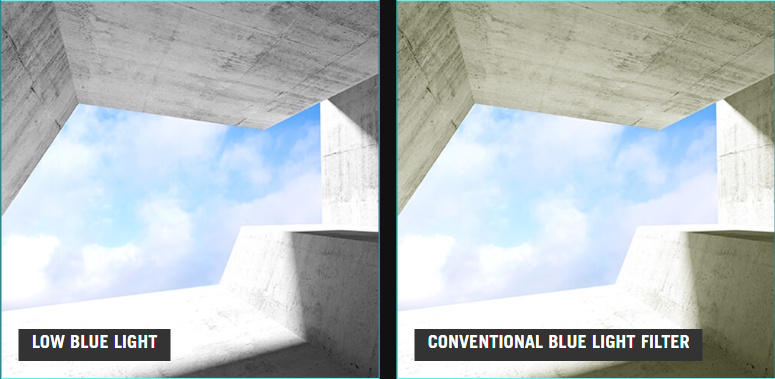
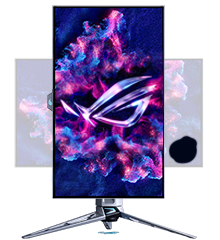
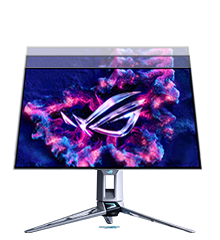
Ergonomic Stand
The specially designed hollowed-out stand offers tilt, swivel, pivot, and height adjustments to provide the ideal viewing position. The display is also VESA wall-mount-compatible.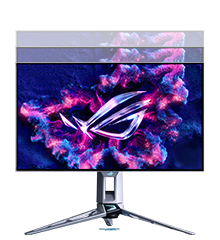
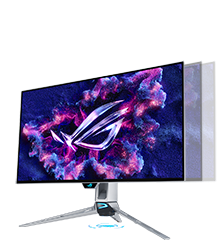
[ 0-110 MM ]
HEIGHT ADJUSTMENT
HEIGHT ADJUSTMENT
[ -30° ~ +30° ]
SWIVEL
SWIVEL
[ -90° ~ +90° ]
PIVOT
PIVOT
[ -5° ~ +20° ]
TILT
TILT
.jpg)
- The actual transfer speed of USB 3.0, 3.1, 3.2, and/or Type-C® will vary depending on many factors including the processing speed of the host device, file attributes and other factors related to system configuration and your operating environment.
- The terms HDMI®, HDMI® High-Definition Multimedia Interface, HDMI® Trade dress and the HDMI® Logos are trademarks or registered trademarks of HDMI® Licensing Administrator, Inc.
- Products certified by the Federal Communications Commission and Industry Canada will be distributed in the United States and Canada. Please visit the ASUS USA and ASUS Canada websites for information about locally available products.
- All specifications are subject to change without notice. Please check with your supplier for exact offers. Products may not be available in all markets.
- Specifications and features vary by model, and all images are illustrative. Please refer to specification pages for full details.
- PCB color and bundled software versions are subject to change without notice.
- Brand and product names mentioned are trademarks of their respective companies.
- Unless otherwise stated, all performance claims are based on theoretical performance. Actual figures may vary in real-world situations.
- For pricing information, ASUS is only entitled to set a recommendation resale price. All resellers are free to set their own price as they wish.
- Price may not include extra fee, including tax, shipping, handling, recycling fee.
About ASUS
ASUS is a multinational company best known for their motherboards, PCs, monitors, graphics cards and routers. Along with an expanding range of superior gaming, content-creation and AIoT solutions, ASUS leads the industry through cutting-edge design and innovations made to create the most ubiquitous, intelligent, heartfelt and joyful smart life for everyone. With a global workforce that includes more than 5,000 R&D professionals, ASUS is driven to become the world’s most admired innovative leading technology enterprise.
About ROG
Republic of Gamers (ROG) is an ASUS sub-brand dedicated to creating the world’s best gaming hardware and software. Formed in 2006, ROG offers a complete line of innovative products known for performance and quality, including motherboards, graphics cards, laptops, desktops, monitors, audio equipment, routers and peripherals. ROG participates in and sponsors major international gaming events. ROG gear has been used to set hundreds of overclocking records and it continues to be the preferred choice of gamers and enthusiasts around the world.
© 2022 ASUS Computer International. All Rights Reserved. ASUS is a registered trademark of ASUSTeK Computer. All specifications and terms are subject to change without notice. Please check with your supplier for exact offers on selected models. Products may not be available in all markets. Product may not be exactly as shown in photos. Actual colors may differ from their appearance due to variation of monitor restrictions and color processing. All trademarks are registered to their respective companies. ASUS shall not be liable for technical or editorial errors or omissions contained herein.
ASUS is a multinational company best known for their motherboards, PCs, monitors, graphics cards and routers. Along with an expanding range of superior gaming, content-creation and AIoT solutions, ASUS leads the industry through cutting-edge design and innovations made to create the most ubiquitous, intelligent, heartfelt and joyful smart life for everyone. With a global workforce that includes more than 5,000 R&D professionals, ASUS is driven to become the world’s most admired innovative leading technology enterprise.
About ROG
Republic of Gamers (ROG) is an ASUS sub-brand dedicated to creating the world’s best gaming hardware and software. Formed in 2006, ROG offers a complete line of innovative products known for performance and quality, including motherboards, graphics cards, laptops, desktops, monitors, audio equipment, routers and peripherals. ROG participates in and sponsors major international gaming events. ROG gear has been used to set hundreds of overclocking records and it continues to be the preferred choice of gamers and enthusiasts around the world.
© 2022 ASUS Computer International. All Rights Reserved. ASUS is a registered trademark of ASUSTeK Computer. All specifications and terms are subject to change without notice. Please check with your supplier for exact offers on selected models. Products may not be available in all markets. Product may not be exactly as shown in photos. Actual colors may differ from their appearance due to variation of monitor restrictions and color processing. All trademarks are registered to their respective companies. ASUS shall not be liable for technical or editorial errors or omissions contained herein.